

Introduction: The Systematic Literature Review Challenge
A systematic literature review serves as a vital pillar of academic research. It enables scholars to synthesize existing knowledge on a specific topic in a methodical, reproducible, and exhaustive manner. However, conducting a traditional review is notoriously time-consuming and labor-intensive. Researchers must identify keywords, query multiple scholarly databases, screen hundreds or thousands of abstracts, and perform meticulous data extraction.
Having spent over a decade in academic research specializing in Control Systems and Industrial Automation, I know this reality firsthand. Throughout my career, I have conducted numerous literature reviews on demanding topics such as the stability of fractional-order systems and observer design for complex control systems. In the past, I spent weeks sorting through hundreds of papers on Scopus, Web of Science, and IEEE Xplore. This repetitive administrative work left very little time for high-value tasks like critical analysis and synthesis.
Fortunately, artificial intelligence has fundamentally transformed this academic workflow. Among the most advanced tools available today, leveraging Elicit for systematic literature reviews has proven to be an exceptional research assistant. In this guide, I share my practical framework on how to use Elicit for systematic literature reviews efficiently, automating time-consuming steps while maintaining the scientific rigor required for high-impact academic publications.

What is Elicit and How Does It Transform Literature Reviews?
Elicit is an AI-powered research assistant developed by Ought. Unlike conventional academic search engines that rely solely on exact keyword matching, Elicit uses advanced large language models to understand, analyze, and synthesize paper content.
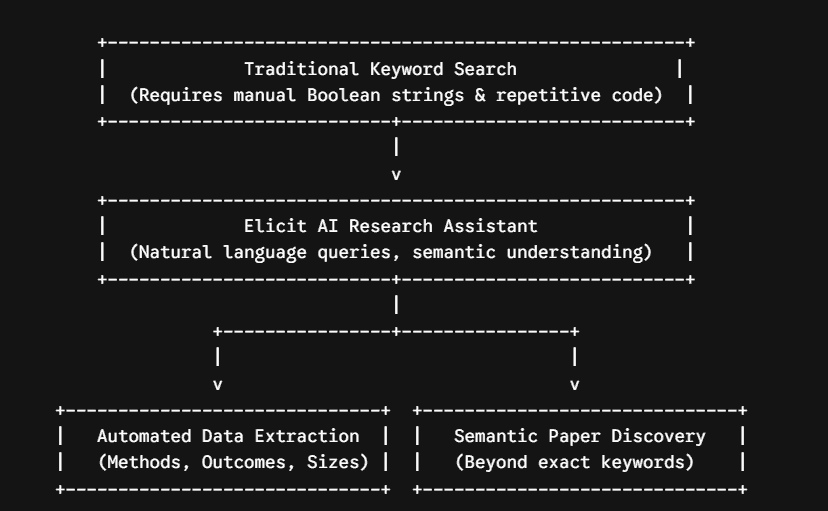
When comparing standard databases with AI-driven discovery, the structural shift becomes clear:
- Natural Language Queries: Instead of requiring complex Boolean search strings, Elicit processes complete, natural language research questions.
- Automated Syntheses: It automatically summarizes key takeaways across multiple papers side by side.
- Targeted Data Extraction: It extracts specific data points directly from PDFs (e.g., sample sizes, methodological approaches, key findings, and intervention types).
- Pattern Recognition: It identifies recurring themes, methodologies, and trends across vast academic corpora.
The first time I deployed Elicit for systematic literature reviews, I was preparing a state-of-the-art review on stabilization techniques for conformable fractional-order systems. Previously, manually screening initial search queries took days. Using Elicit, I completed an initial structured screening within hours.
It is important to emphasize a core principle I teach my doctoral students: using Elicit for systematic literature reviews does not replace human researcher judgment. Instead, it serves as a powerful research accelerator during screening and analysis, reducing selection bias and human oversight.
Preparing Your Systematic Review Before Using Elicit
Rigorous preparation remains essential before launching any AI tool. The classic principle “garbage in, garbage out” applies directly to AI-assisted research.
1. Define a Clear Research Question (PICO/PECO)
Elicit performs best with structured, natural language questions. Rather than entering isolated keywords like “machine learning cancer diagnosis,” formulate a complete query: “What are the most accurate machine learning models for early diagnosis of lung cancer based on CT scans?” Because Elicit functions primarily in English, phrasing your research question in English ensures optimal results.
2. Establish an Inclusion and Exclusion Protocol
Define clear eligibility criteria—including publication year limits, study types, participant demographics, and methodological frameworks—before screening. This protocol guides your evaluation when using Elicit for systematic literature reviews.
3. Identify Related Terminology
While Elicit excels at semantic processing, maintaining a reference list of related technical terms (such as “deep learning,” “neural networks,” or “radiomics”) helps refine search parameters in later stages.
Step-by-Step Guide: Using Elicit for Systematic Literature Reviews
Integrating Elicit for systematic literature reviews into a standard systematic review workflow follows a structured, multi-step process.
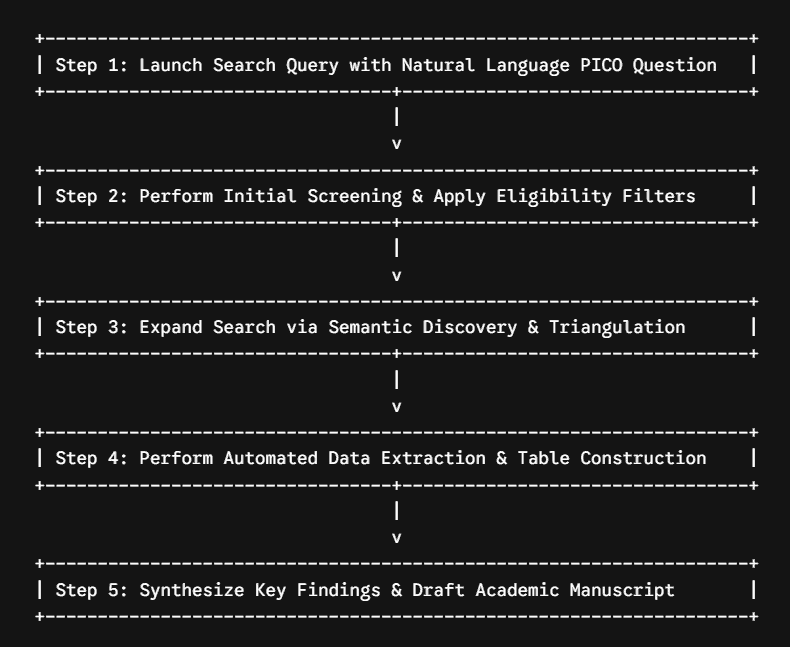
Step 1: Launching the Research Query
- Visit
elicit.comand log in to your account. - Enter your structured research question into the primary query bar.
- Review the initial list of relevant papers returned by Elicit, sorted by semantic relevance.
For every retrieved paper, Elicit displays:
- Publication metadata (title, authors, journal, and year).
- An AI-generated abstract summary tailored to your question.
- Core takeaway points extracted directly from the paper.
- Direct links to Open Access PDFs when available.
Pro-Tip: Use the “Add a column” feature at this stage to extract custom variables across retrieved papers (such as population size, control strategy, or primary outcome metrics).
Step 2: Abstract Screening and Paper Selection
This stage highlights the primary value of using Elicit for systematic literature reviews:
- Metadata Filtering: Use built-in filters to refine results by publication year, study design (e.g., randomized controlled trials, meta-analyses, systematic reviews), and citation counts to apply your inclusion criteria.
- Efficient Abstract Evaluation: Evaluate AI-generated summaries and key takeaways directly within the Elicit interface instead of opening dozens of browser tabs. Mark papers as Relevant or Not Relevant. Elicit adjusts subsequent rankings based on these preferences.
- Reference Export: Once initial screening is complete, export your selected study list in
.csvor.BibTeXformats. Import these files into reference managers like Zotero or EndNote for citation tracking.
Step 3: Refining and Expanding the Search
After initial screening, using Elicit for systematic literature reviews helps uncover papers that traditional keyword queries might miss.
Features like “Similar papers” and “Related questions” allow researchers to explore semantically related literature. This iterative discovery method uncovers critical studies that use alternative terminology for similar underlying concepts.
To maintain methodological rigor, combine your Elicit workflow with traditional scholarly databases. Cross-reference your results with Scopus, Web of Science, and IEEE Xplore using Boolean queries derived from your PICO criteria.
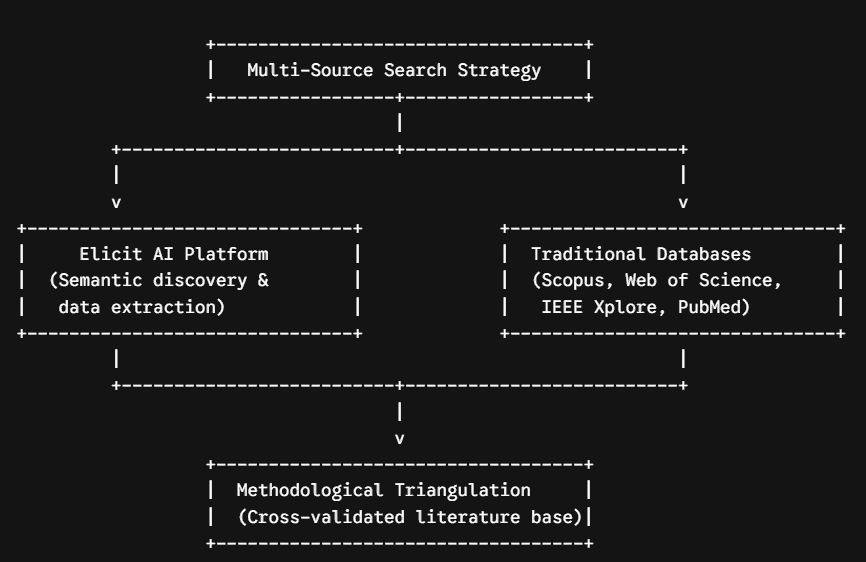
Documenting this multi-source strategy in your review’s methodology section validates your search protocol and ensures comprehensive literature coverage.
Step 4: In-Depth Analysis and Data Extraction
Extracting structured data across studies is a crucial phase in writing a systematic review:
- Create a Dedicated Literature Review Folder: Organize selected studies within Elicit by adding them to a dedicated project folder.
- Query the Corpus Directly: Ask targeted questions across all uploaded PDFs simultaneously:
- “What are the primary control methodologies used in these papers?”
- “What limitations do the authors report regarding system stability?”
- “List all performance metrics evaluated.”
- Build Comparative Extraction Tables: Use the “Add column” feature to extract custom parameters (e.g., sample size, p-values, effect sizes, or frequency response metrics) into a structured matrix.
Step 5: Synthesis and Manuscript Drafting
Organized extractions within Elicit provide a solid foundation for drafting your manuscript:
- Use key takeaway tables to compare methodologies across studies.
- Synthesize corpus query outputs to draft your methodology, results, and discussion sections.
- Verify AI summaries against original source PDFs to ensure absolute accuracy.
Best Practices and Limitations When Using Elicit
Best Practices
- Always Verify Primary Sources: Large language models can occasionally misinterpret technical details. Always cross-reference extracted metrics with the original source PDF before publication.
- Iterate Your Query Protocol: Use new terms and concepts discovered during screening to refine your core research question.
- Maintain Multi-Database Coverage: Combine Elicit with established academic databases (such as Scopus, Web of Science, and PubMed) to ensure complete coverage.
Key Limitations to Keep in Mind
- Database Scope: Elicit relies heavily on the Semantic Scholar corpus. Highly specialized niche journals or restricted-access repositories may not be fully indexed.
- Language Specificity: Elicit performs best with English-language literature. Non-English studies may yield less consistent summaries or extractions.
- Contextual Nuance: AI models may miss subtle methodological nuances in complex experimental designs. Human evaluation remains necessary throughout the process.
Conclusion: The Future of Collaborative Academic Research
Using Elicit for systematic literature reviews represents a modern, efficient evolution in research methodology. After years of conducting manual literature reviews, I view this technology as a measurable, reproducible step forward for academic productivity.
AI tools do not replace critical thinking, domain expertise, or scholarly rigor. Instead, they act as efficient research assistants that handle repetitive data extraction tasks. Automating early screening with Elicit for systematic literature reviews allows scholars to focus on high-value tasks: critical analysis, synthesis, and developing novel research frameworks.
I recommend integrating Elicit for systematic literature reviews early in the thesis or paper writing process. By combining AI-assisted workflows with rigorous verification, researchers can save time while improving the overall quality of their literature reviews.
If you found this guide useful and want to go further in integrating AI into your research workflow, explore our dedicated section: AI for Scientific Research — a curated collection of practical guides and tool comparisons designed for researchers who, like you, want to use Elicit for Systematic Literature Reviews and other AI tools with full methodological rigor.
Frequently Asked Questions (FAQ)
Is Elicit free to use?
Elicit offers a free tier with monthly search credits. Paid subscription plans provide additional credits, expanded PDF upload capacity, and advanced corpus querying capabilities. For researchers conducting intensive systematic reviews or doctoral dissertations, a premium subscription often pays for itself in time saved.
Can Elicit replace reference managers like Zotero or EndNote?
No. Elicit excels at paper discovery, abstract screening, and automated data extraction. However, for long-term reference organization, PDF storage, and generating in-text citations in Word or LaTeX, dedicated reference managers like Zotero or EndNote remain essential. The most effective workflow uses Elicit for discovery and analysis, and Zotero for reference management.
How does Elicit support methodology reproducibility?
Reproducibility depends on your research protocol rather than the software itself. Document your natural language research questions, search dates, applied filters, and inclusion/exclusion criteria. Export and archive .csv files of your Elicit results at each review stage to maintain an auditable research record.
Are there alternative tools to Elicit for literature reviews?
Yes. Alternative academic AI tools include Scopus AI, ResearchRabbit, Litmaps, SciSpace, and Consensus. While each platform has distinct strengths, Elicit stands out for its custom data extraction columns and corpus-wide querying capabilities, making it particularly well-suited for systematic literature reviews.
Can Elicit analyze non-English research papers?
Elicit is optimized for English-language literature. While it can process non-English documents, summaries and extracted data points may be less accurate. Conducting searches in English remains the standard practice for achieving optimal results with Elicit.
Written by: Assaad Jmal – PhD, University Professor and Researcher

- Best AI Grading Tools for Teachers: Grade 2x Faster (Top 5 Tested) - 17 October 2026
- Which AI Is Best for Students in 2027? Our Comparison Across 6 Real-World Tasks (Summarizing, Coding, Essays, Math, Translation, Feedback) Saves You 10 Hours of Research - 10 October 2026
- How to Design AI-Proof Assessments: The Complete Guide with 5 Proven Methods for ChatGPT-Resistant Assignments - 2 October 2026