
Have you ever spent hours—or even days—scouring dozens of academic papers trying to find a precise, evidence-based answer to a specific research question? If so, you are not alone. As an active higher education professor and researcher, I know this exact frustration all too well.
Several years ago, while preparing a literature review on robust control methods for fractional-order systems, I spent over a full week manually sorting through hundreds of published papers across databases like IEEE Xplore, Web of Science, and Scopus. For every single article, I had to open the PDF file, carefully read the abstract, assess its relevance, take detailed notes, and organize the extracted data. It was an exhausting, repetitive process that consumed valuable cognitive energy—energy that should have been spent on critical analysis, synthesis, and developing novel scientific contributions.
It was precisely during this demanding workflow that I discovered Consensus—and realized exactly how to use Consensus to fundamentally transform my academic productivity. Information overload is one of the single greatest challenges facing modern science. While Consensus does not magically erase the massive volume of published literature, it renders it completely manageable.
In this comprehensive guide, you will discover exactly how to use Consensus to elevate your own academic workflow. Drawing on my personal experience as a PhD university researcher, I will break down practical step-by-step methodologies and share the exact AI-assisted literature strategies I teach my doctoral students at the beginning of their dissertations.
Why Incorporate Consensus Into Your Research Toolkit?
Before diving into the technical details of how to use Consensus, it is essential to address why you should adopt it. As a researcher accustomed to rigorous scientific methodologies, I never alter my analytical habits lightly—and I expect you approach new platforms with the same healthy skepticism.
Consensus is not merely another general search engine. It is an AI-powered search tool specifically engineered to meet the stringent demands of the global scientific community.
Unlike Google Scholar, which presents a plain list of articles without synthesized context, or general conversational tools like ChatGPT that risk hallucinating non-existent citations (a mistake I have had to correct in several student papers), learning how to use Consensus enables you to accomplish three core research objectives with absolute precision:
=> Synthesize Scientific Evidence: The platform aggregates results across multiple independent studies to present a clear, high-level scientific consensus. This allows me to evaluate the maturity of a field instantly and position my own research effectively.
=> Extract Direct Conclusions: Consensus scans peer-reviewed scientific papers and extracts their primary findings. When I analyze system stability in control engineering, I no longer need to read 40 pages just to determine whether a study supports or refutes a specific hypothesis.
=> Cite Sources Traceably: Every extracted insight links directly to the original peer-reviewed paper from which it was pulled. For researchers publishing in peer-reviewed journals, this complete traceability is non-negotiable.
The objective is not to replace critical reading—I continue to read core foundational papers in full. Rather, learning how to use Consensus saves invaluable time by pinpointing the most relevant evidence in seconds.
How to Use Consensus: The Complete Step-by-Step Guide
Step 1: Navigating the Interface and Core Search Features
The first step in mastering how to use Consensus is becoming familiar with its user interface. Navigate to the official platform and register for an account. The dashboard is designed to be intuitive and uncluttered.
At the center of the dashboard lies the primary search bar. The key to retrieving high-quality insights is posing direct, closed, or open-ended scientific questions rather than entering broad keywords.
- Phrasing to avoid:
"caffeine sleep effects" - Recommended phrasing:
"Does caffeine impair sleep duration?"or"What are the primary effects of caffeine on sleep architecture?"
Understanding this question-answering framework forms the cornerstone of how to use Consensus effectively.
Step 2: Formulating Optimal Queries and Applying Filters
The accuracy of your search results correlates directly with how well you formulate your input prompt. Refining your query structure is a critical skill when learning how to use Consensus.
Key Query Guidelines:
Use Natural Language: Frame your query clearly, as though you were asking a research colleague.
Be Specific: Instead of asking "Is intermittent fasting healthy?", ask "Does intermittent fasting reduce body mass index in overweight adults?".
Leverage Built-in Filters: Refine your search parameters using filters before or immediately after executing a search:
- Publication Year: Restrict your query to modern studies (e.g., the last 5–10 years).
- Study Design: Target high-evidence study types such as Systematic Reviews, Meta-Analyses, or Randomized Controlled Trials (RCTs).
- Journal Impact / SCImago (SJR): Filter papers based on source ranking to prioritize top-tier publications.
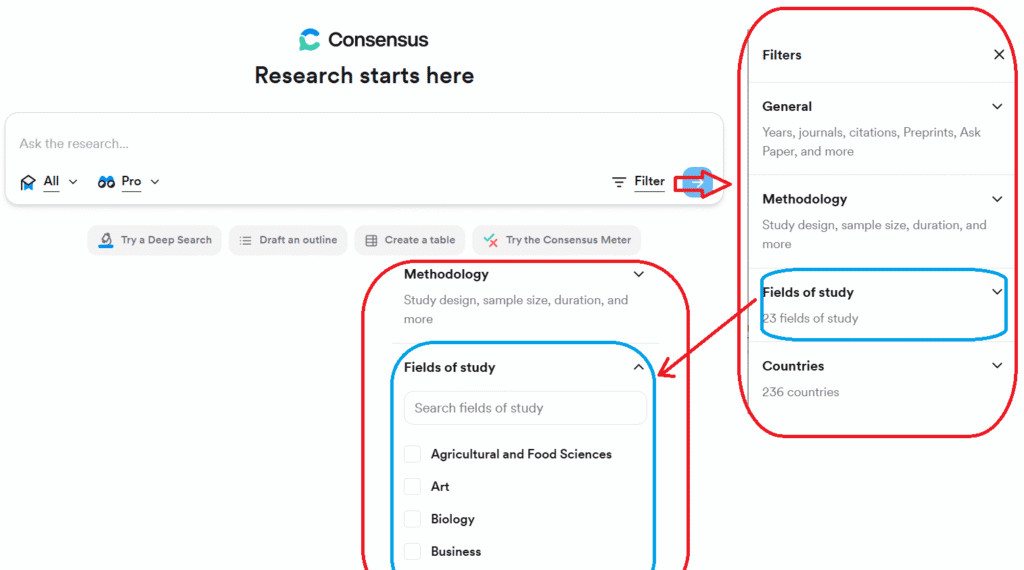
Mastering query formulation alongside granular filter customization guarantees precise, highly relevant literature yields.
Step 3: Decoding and Analyzing the Results Interface
Once you submit your research question, the platform displays a structured results page. Knowing how to interpret each component is central to how to use Consensus:
1. The AI Synthesis Snapshot
Located at the top of the search results, the AI Synthesis Snapshot provides a concise summary of findings derived from the retrieved paper set. It provides an immediate overview of the literature, though you should always verify the underlying sources listed below it.
2. Individual Study Snapshots
Each entry represents a single peer-reviewed paper. The platform automatically extracts the sentence or key finding that directly answers your query. For each paper, you can view:
- The article title, authors, and publication year.
- The journal name, SCImago quartile rank, and citation count.
- Key study metrics (e.g., sample size, study design, or animal vs. human subjects).
3. The Consensus Meter
For binary or highly directional questions (e.g., “Does X cause Y?”), the platform presents a visual Consensus Meter. This feature calculates the percentage of analyzed papers that answer Yes, No, or Possibly/Mixed. Evaluating this indicator provides an instant assessment of scientific agreement across published literature.
Step 4: Advanced Features for Literature Synthesis
To maximize your research output, you must go beyond basic searches and explore advanced tools within the platform.
Consensus Copilot
Consensus Copilot acts as an interactive AI research assistant. If you ask a multi-faceted question like “What are the primary drivers of deforestation in the Amazon basin?”, Copilot organizes the results into thematic sub-categories (e.g., Commercial Agriculture, Logging Infrastructure, Cattle Ranching) and maps individual studies directly to those sub-themes.
Literature Review Generator
By entering a broader domain topic (such as "cognitive behavioral therapy for anxiety disorders"), the Literature Review tool builds an organized synthesis matrix. It highlights foundational meta-analyses, common research questions, and seminal papers across the field, giving you an ideal jumping-off point for new review manuscripts.
Collection Management and Citation Export
Organize retrieved papers into customized project collections. You can export selected citations in standard formats like .BibTeX or .csv for seamless integration into reference managers like Zotero or EndNote.
Modernizing your workflow means using tools in tandem. For instance, when conducting systematic reviews, combining Consensus with Elicit offers a distinct analytical edge, as outlined in our Ultimate Guide on How to Use Elicit for Systematic Literature Reviews.
Step 5: Integrating Consensus Into Your Standard Academic Workflow
To fully integrate the platform into your daily research routine, align how to use Consensus with specific project phases:
- Exploratory Phase: Use the platform during early concept development to map out scientific consensus, identify prevailing hypotheses, and locate seminal papers.
- Drafting Phase: When writing a manuscript and needing an evidence-based citation to back up a claim, query the platform to quickly locate supporting literature.
- Literature Monitoring Phase: Set up topic alerts to keep up with newly published studies in your field.
Real-World Case Study: Querying Control Systems Performance
To illustrate how to use Consensus in practice, let’s examine a query from my own field:
Query: “Are deep learning-based control methods more effective than traditional control algorithms for robotic manipulators?”
Here is a screenshot of the top of the results page (as you can see, I asked this query in french):

Quick scan of the screenshot
As shown in the screenshot, the results page is divided into two parts: on the left, the summary report developed by Consensus, and on the right, the list of references it used and cited.
Key points to explain:
- “Consensus Meter” data: Near the center of the screenshot, the large red rectangle displays the “Consensus Meter” data. For the question I asked—using the “Pro” search option—the tool analyzed and utilized 20 references. Of these, 12 contributed to the “Consensus Meter” reading: 11 (92% of the 12) provided a “Yes” answer to my question, while 1 (8%) provided a “No” answer. No references offered a nuanced response (such as “Possibly” or “Mixed”). Knowing how to interpret this data is essential for learning how to use Consensus.
- Search settings: At the top, just below the question, the settings used by Consensus for this search are displayed (small red rectangle at the top). The “Pro” search mode analyzes and utilizes 20 references. The “2 steps” label refers to the number of steps Consensus went through to generate the provided result (a detail of little importance to the user).
- Search option: The small red rectangle at the bottom of the screenshot indicates this option. There are three choices: 1- “Quick”: allows you to analyze and cite 10 references. This option can be used without limits. 2- “Pro” (shown in the screenshot): allows you to analyze and cite 20 references. This option can be used 15 times per month with a free account. 3- “Deep”: allows you to analyze and cite 50 references (used for “Literature Review”). This option can be used 3 times per month with a free account.
Practical Best Practices and Pitfalls to Avoid
Recommended Practices (DOs)
- Cross-Reference Supporting Citations: Use the platform for rapid discovery, but always read the primary source PDF before citing key findings in major publications.
- Filter by Systematic Reviews: Use the study-type filter to isolate meta-analyses and systematic reviews for high-level evidence.
- Ask Directional or Closed Questions: Binary (“Does X increase Y?”) or specific questions yield the clearest data extractions.
Common Pitfalls (DON’Ts)
- Do Not Rely Exclusively on AI Summaries: AI snapshots provide an excellent overview, but they do not replace human critical analysis.
- Do Not Ignore Publication Dates: Pay close attention to study publication years, especially in rapidly changing fields like artificial intelligence or control engineering.
- Do Not Rely on a Single Search Tool: Treat the platform as a complement to databases like PubMed, IEEE Xplore, Scopus, and Web of Science.
Conclusion: Elevate Your Academic Productivity
Mastering how to use Consensus is an investment that yields immediate dividends in research efficiency and workflow speed. This step-by-step guide covered how to frame precise queries, evaluate scientific agreement using the Consensus Meter, leverage Copilot features, and integrate the platform into your daily research routine.
Since incorporating this tool into my work on system stability and fractional-order control, I have reduced initial literature screening times by at least 60%. This time saved translates directly into more time for high-value research activities: deep critical analysis, experimental validation, and writing original papers.
Consensus will not do the hard thinking for you—nor should it. However, it directs you straight to relevant scientific evidence, eliminating hours of tedious manual sorting. Now that you know how to use Consensus, you can apply a smarter method the next time you face literature overload.
Test it out on your current research project and feel the productivity boost firsthand. I use it, my doctoral students use it, and none of us have looked back.
Take Action: What is the first research question you will run through Consensus to accelerate your current project?
Written by: Assaad Jmal – PhD, University Professor and Researcher

- Best AI Grading Tools for Teachers: Grade 2x Faster (Top 5 Tested) - 17 October 2026
- Which AI Is Best for Students in 2027? Our Comparison Across 6 Real-World Tasks (Summarizing, Coding, Essays, Math, Translation, Feedback) Saves You 10 Hours of Research - 10 October 2026
- How to Design AI-Proof Assessments: The Complete Guide with 5 Proven Methods for ChatGPT-Resistant Assignments - 2 October 2026